---
title: How should I handle leases that are out of scope or have expired?
description: Allow users to remove out of scope or inactive leases from standard reviews and reports without deleting data.
---
[Skip to content](https://help.occupier.com/knowledge/how-should-i-handle-leases-that-are-out-of-scope-or-have-expired#main-content)
English
Show submenu for translations
[Customer portal](https://help.occupier.com/tickets-view?hsLang=en)
![H-Teal (1).svg\]](https://help.occupier.com/hubfs/H-Teal%20(1).svg)
- [Tickets](https://3455891.hs-sites.com/tickets-view)
- [Sign out](https://3455891.hs-sites.com/_hcms/mem/logout)
Open main navigation
Close main navigation
- [Tickets](https://3455891.hs-sites.com/tickets-view)
- [Sign out](https://3455891.hs-sites.com/_hcms/mem/logout)
- English
Show submenu for translations
- [Customer portal](https://help.occupier.com/tickets-view)
Hi there! How can we help?
- There are no suggestions because the search field is empty.
1. [Help Center](https://help.occupier.com/knowledge?hsLang=en)
2. [Lease Accounting](https://help.occupier.com/knowledge/lease-accounting?hsLang=en)
3. [Recognizing a Lease](https://help.occupier.com/knowledge/lease-accounting?hsLang=en#recognizing-a-lease)
# How should I handle leases that are out of scope or have expired?
## Occupier now offers two lease states in the Lease Accounting module—Out of Scope and Expired (Archived)—so teams can hide inactive leases from views and reports without deleting any data.
Occupier now provides two specialized lease states in the Lease Accounting module to help corporate accounting teams maintain clean, accurate portfolios: Out of Scope and Expired (Archived). These states allow users to remove irrelevant or inactive leases from standard views and reports without permanently deleting any data.
| **NOTE:** This feature is available in the Lease Accounting module. It is intended for accountants who need to manage leases that are no longer active or do not require financial reporting. |
| --- |
| **State** | **What It Means** | **How It Is Set** |
| --- | --- | --- |
| Out of Scope | Lease is intentionally excluded from financial reporting and calculations. | Manually by a user from the Incomplete lease state. |
| Expired (Archived) | Lease term has ended and the fiscal year containing the expiration date has closed. | Automatically by the system. |
### 2. Understanding the Two States
#### 2.1 Out of Scope
Reclassifying a lease as Out of Scope is important when a lease does not meet the criteria for accounting under standards like ASC 842 or IFRS 16 or meet an organizations accounting policy or elections. This ensures your portfolio remains accurate and compliant by excluding leases that are not subject to these specific reporting requirements.
The Out of Scope status allows users to exclude a lease from financial reporting without deleting it. Common use cases include:
- A legal entity whose journal entries are managed by an ERP system that automatically generates entries for the entity and its subsidiaries, removing the need to maintain more than one lease schedule in Occupier. This typically applies when journal entries are created in one parent or subsidiary entity and then consolidated through additional entries within the ERP.
- Immaterial leases that do not require measurement or disclosure under the applicable accounting standard.
**Key behaviors:**
- Out of Scope leases are excluded from the Accounting Lease Index and all reports by default.
- The lease record and all associated documents are fully preserved; no data is deleted.
- An audit trail records who changed the status and when.
- The action can be reversed at any time by using the Recognize action.
#### 2.2 Expired (Archived)
When a lease term ends, Occupier does not immediately remove it from active views. Instead, the system waits until the end of the fiscal year in which the lease expired, then automatically moves the lease to Archived status.
**Example:** If a lease expires in June 2025 and the customer's fiscal year ends December 31, the lease remains in its current active state through December 2025, and is automatically archived on January 1, 2026.
**Key behaviors:**
- Only leases in a Completed state are automatically archived at fiscal year end.
- When a parent lease is archived, all descendant leases are automatically archived as well.
- Archived leases remain fully accessible for historical reporting, disclosures, and compliance.
- An archived lease can be amended — adding a measurement after the expiration date will restore it to active status if the new dates fall within the current fiscal year.
### 3. Marking a Lease as Out of Scope
#### 3.1 Prerequisites
Before a lease can be marked as Out of Scope, the following conditions must be met:
- The lease must be in Incomplete status (no existing measurements).
- Parent leases with manual stand-alone measurements and active descendant leases can also be marked Out of Scope. This action is only available at the parent level and cannot be applied to descendant or child entity leases.
#### 3.2 Step-by-Step: Marking a Lease as Out of Scope
Follow these steps from the Lease Accounting module:
- Navigate to the **Lease Accounting** module and open the desired lease from the Accounting Lease Index.
- Click the **Mark Out of Scope**
****
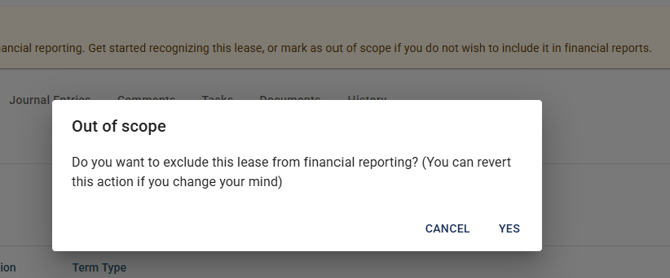
- A confirmation dialog will appear: *"Do you want to exclude this lease from financial reporting? (You can revert this action if you change your mind)"* Select **Yes** to confirm, or **Cancel** to return.
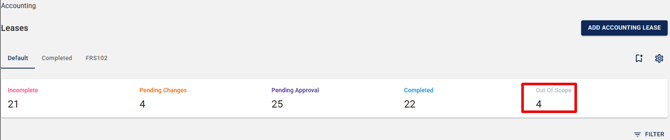
- Once confirmed, the lease status on the detail page updates to **Out of Scope**, and the lease is removed from the default Accounting Lease Index view.
| **NOTE:** For manual stand-alone parent leases with active descendant leases, the Out of Scope action is available only on the parent lease. Child or descendant leases cannot be marked Out of Scope individually; use the Delete option instead. |
| --- |
### 4. Reverting an Out of Scope Lease (Recognize)
Any lease marked as Out of Scope can be returned to Incomplete status at any time using the Recognize action.
#### 4.1 Steps to Recognize a Lease
- Open the Out of Scope lease from the Accounting Lease Index (you will need to filter for Out of Scope leases — see Section 6).
- On the lease page, click **Recognize**.

- A confirmation dialog will appear: *"Do you want to include this lease in financial reporting? (You can revert this action if you change your mind)"* Select **Yes** to confirm.
- The lease status returns to **Incomplete** and is visible in the default Accounting Lease Index again.
### 5. Expired Leases — Automatic Archiving
#### 5.1 How the Archiving Process Works
#### Archiving criteria:
- The lease must be in Completed status.
- The lease's expiration date must fall within a fiscal year that has already ended based on the your company's fiscal calendar.
- When a parent lease is archived, all its descendant leases are automatically archived as well.
- If a lease's expiration date is changed after it was archived, the system re-evaluates whether the lease should remain archived.
### Fiscal year example:
| **Lease Expiration** | **Fiscal Year End (Dec 31)** | **Archived On** |
| --- | --- | --- |
| June 30, 2025 | December 31, 2025 | January 1, 2026 |
| March 15, 2025 | December 31, 2025 | January 1, 2026 |
| September 1, 2026 | December 31, 2026 | January 1, 2027 |
#### 5.2 Amending an Archived Lease
Archived leases are not locked. You can add a new measurement after the expiration date at any time:
- Use the + Measurement button in the Measurements tab on the archived lease detail page.
- If the new expiration dates fall within the current fiscal year, the lease automatically returns to Active status.
- You may also amend the lease via Lease Administration module in the standard process: select amend, enter lease terms and submit.
### 6. Filtering and Viewing Out of Scope / Archived Leases
#### 6.1 Accounting Lease Index — Default View
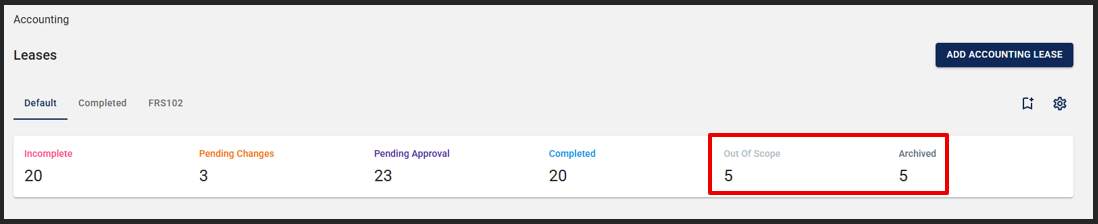
By default, the Accounting Lease Index displays only active leases. Out of Scope and Archived leases are excluded from the default view but can be accessed using filters. The lease count dashboard shows how many leases are in each of these statuses.
#### 6.2 Filtering by Status
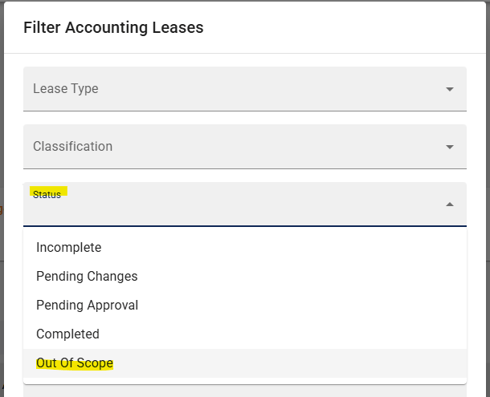
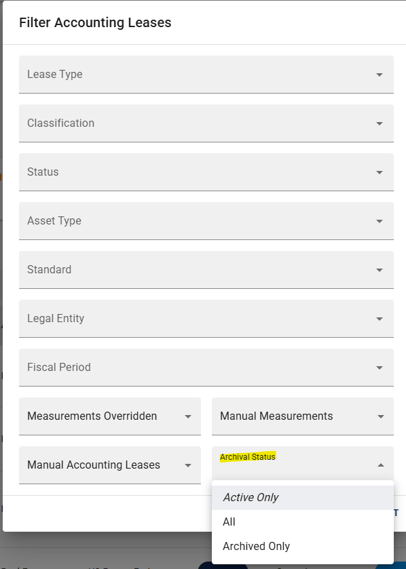
To view Out of Scope or Archived leases, use the filter panel on the Accounting Lease Index:
- On the Accounting Lease Index, open the **Filters**
- Locate the **Status** filter (for Out of Scope)
- or the **Archival Status** filter (for Expired leases).
- For Archived leases, select one of three options:
- Active only (default)
- Archived only
- All (active + archived)
#### 6.3 Exporting Archived / Out of Scope Leases
Exports from the Accounting Lease Index respect your Archived and Out of Scope filters, and each export clearly flags whether a lease is archived or Out of Scope.
Frequently Asked Questions
### Q: Can I manually move a lease to Expired/Archived status?
No. The Expired (Archived) status is set automatically by the system based on the lease expiration date and the customer's fiscal calendar. Users cannot manually archive a lease.
### Q: What happens to journal entries and reports for an archived lease?
Archived leases are excluded from the default Lease Index and standard reports. However, they remain fully accessible for historical reporting and analysis.
### Q: Can I change an Out of Scope lease back to active?
Yes. To revert a lease to Incomplete status, click the **Recognize** action on the lease page. Once the lease is in Incomplete status, you can walk through the standard measurement steps again, just as you would when measuring a new lease.
### Q: What if a lease expires mid-fiscal year — will it still show on reports until year-end?
Yes. A lease whose term ends mid-fiscal year remains in its current active state (Incomplete, Pending Changes, Pending Approval, or Completed) until the end of that fiscal year. It will only move to Archived status after the fiscal year has ended and in a “Completed” state.
### Q: What if the parent and child leases have different expiration dates?
Occupier displays a warning message on the affected lease detail pages indicating a date mismatch. You should review and align expiration dates across all related leases to ensure data integrity. Overrides for accounting purposes (e.g., exercising a renewal option) are supported, but the dates should be consistent across the hierarchy.
### Need Help?
If you have questions about managing Out of Scope or Expired leases, please reach out to the Occupier Customer Success team at customersuccess@occupier.com.
- [Getting Started](https://help.occupier.com/knowledge/getting-started?hsLang=en#main-content)
- [The Basics](https://help.occupier.com/knowledge/getting-started?hsLang=en#the-basics)
- [Occupier Onboarding & Abstraction](https://help.occupier.com/knowledge/getting-started?hsLang=en#occupier-onboarding-abstraction)
- [User & Team Management](https://help.occupier.com/knowledge/getting-started?hsLang=en#user-team-management)
- [Email & Notification Management](https://help.occupier.com/knowledge/getting-started?hsLang=en#email-notification-management)
- [Custom Data Management](https://help.occupier.com/knowledge/getting-started?hsLang=en#custom-data-management)
- [Lease Administration](https://help.occupier.com/knowledge/lease-administration?hsLang=en#main-content)
- [Equipment Leases](https://help.occupier.com/knowledge/lease-administration?hsLang=en#equipment-leases)
- [Change History Log](https://help.occupier.com/knowledge/lease-administration?hsLang=en#change-history-log)
- [Clauses](https://help.occupier.com/knowledge/lease-administration?hsLang=en#clauses)
- [Document Storage](https://help.occupier.com/knowledge/lease-administration?hsLang=en#document-storage)
- [Financials](https://help.occupier.com/knowledge/lease-administration?hsLang=en#financials)
- [Creating & Editing a Lease](https://help.occupier.com/knowledge/lease-administration?hsLang=en#creating-editing-a-lease)
- [Critical Dates](https://help.occupier.com/knowledge/lease-administration?hsLang=en#critical-dates)
- [Lease Column Configurations](https://help.occupier.com/knowledge/lease-administration?hsLang=en#lease-column-configurations)
- [Custom Fields](https://help.occupier.com/knowledge/lease-administration?hsLang=en#custom-fields)
- [Contacts](https://help.occupier.com/knowledge/lease-administration?hsLang=en#contacts)
- [Filtering](https://help.occupier.com/knowledge/lease-administration?hsLang=en#filtering)
- [Assets](https://help.occupier.com/knowledge/lease-administration?hsLang=en#assets)
- [Lease Data Exports](https://help.occupier.com/knowledge/lease-administration?hsLang=en#lease-data-exports)
- [Occupier Analytics Dashboard](https://help.occupier.com/knowledge/lease-administration?hsLang=en#occupier-analytics-dashboard)
- [Customizing Data Categories](https://help.occupier.com/knowledge/lease-administration?hsLang=en#customizing-data-categories)
- [Lease Admin Overview](https://help.occupier.com/knowledge/lease-administration?hsLang=en#lease-admin-overview)
- [Column Configuration & Filtering](https://help.occupier.com/knowledge/lease-administration?hsLang=en#column-configuration-filtering)
- [Tasks & Commenting](https://help.occupier.com/knowledge/lease-administration?hsLang=en#tasks-commenting)
- [Lease Payables](https://help.occupier.com/knowledge/lease-administration?hsLang=en#lease-payables)
- [Lease Data Imports](https://help.occupier.com/knowledge/lease-administration?hsLang=en#lease-data-imports)
- [Percentage Rent](https://help.occupier.com/knowledge/lease-administration?hsLang=en#percentage-rent)
- [Lease Accounting](https://help.occupier.com/knowledge/lease-accounting?hsLang=en#main-content)
- [Understanding ASC 842, IFRS16, GASB87 and FRS102](https://help.occupier.com/knowledge/lease-accounting?hsLang=en#understanding-asc-842-ifrs16-gasb87-and-frs102)
- [Account Set-up](https://help.occupier.com/knowledge/lease-accounting?hsLang=en#account-set-up)
- [FX Rates](https://help.occupier.com/knowledge/lease-accounting?hsLang=en#fx-rates)
- [Recognizing a Lease](https://help.occupier.com/knowledge/lease-accounting?hsLang=en#recognizing-a-lease)
- [Impairing a Lease](https://help.occupier.com/knowledge/lease-accounting?hsLang=en#impairing-a-lease)
- [Lease Modifications](https://help.occupier.com/knowledge/lease-accounting?hsLang=en#lease-modifications)
- [Lease Accounting Reporting](https://help.occupier.com/knowledge/lease-accounting?hsLang=en#lease-accounting-reporting)
- [Importing Data Into Accounting](https://help.occupier.com/knowledge/lease-accounting?hsLang=en#importing-data-into-accounting)
- [Allocations](https://help.occupier.com/knowledge/lease-accounting?hsLang=en#allocations)
- [Close Books Process](https://help.occupier.com/knowledge/lease-accounting?hsLang=en#close-books-process)
- [NetSuite Journal Entry Integrations](https://help.occupier.com/knowledge/lease-accounting?hsLang=en#netsuite-journal-entry-integrations)
- [Transaction Management](https://help.occupier.com/knowledge/transaction-management?hsLang=en#main-content)
- [Task Templates](https://help.occupier.com/knowledge/transaction-management?hsLang=en#task-templates)
- [Filtering](https://help.occupier.com/knowledge/transaction-management?hsLang=en#filtering)
- [Custom Categories](https://help.occupier.com/knowledge/transaction-management?hsLang=en#custom-categories)
- [Deal Column Configurations](https://help.occupier.com/knowledge/transaction-management?hsLang=en#deal-column-configurations)
- [Documents](https://help.occupier.com/knowledge/transaction-management?hsLang=en#documents)
- [Comps](https://help.occupier.com/knowledge/transaction-management?hsLang=en#comps)
- [Deal Stages](https://help.occupier.com/knowledge/transaction-management?hsLang=en#deal-stages)
- [Creating & Editing a Deal](https://help.occupier.com/knowledge/transaction-management?hsLang=en#creating-editing-a-deal)
- [Site Selection](https://help.occupier.com/knowledge/transaction-management?hsLang=en#site-selection)
- [Broker Deals CRM](https://help.occupier.com/knowledge/broker-deals-crm?hsLang=en#main-content)
- [Custom Deal Stages](https://help.occupier.com/knowledge/broker-deals-crm?hsLang=en#custom-deal-stages)
- [Custom Fields](https://help.occupier.com/knowledge/broker-deals-crm?hsLang=en#custom-fields)
- [Broker Deal Exports](https://help.occupier.com/knowledge/broker-deals-crm?hsLang=en#broker-deal-exports)
- [Broker Digest emails](https://help.occupier.com/knowledge/broker-deals-crm?hsLang=en#broker-digest-emails)
- [Critical Date Columns](https://help.occupier.com/knowledge/broker-deals-crm?hsLang=en#critical-date-columns)
- [Creating & Editing a Deal](https://help.occupier.com/knowledge/broker-deals-crm?hsLang=en#creating-editing-a-deal)
- [Comps](https://help.occupier.com/knowledge/broker-deals-crm?hsLang=en#comps)
- [Site Selection](https://help.occupier.com/knowledge/broker-deals-crm?hsLang=en#site-selection)
- [Broker Deal Teams](https://help.occupier.com/knowledge/broker-deals-crm?hsLang=en#broker-deal-teams)
- [Negotiations & Proposals](https://help.occupier.com/knowledge/broker-deals-crm?hsLang=en#negotiations-proposals)
- [Clients Tab](https://help.occupier.com/knowledge/broker-deals-crm?hsLang=en#clients-tab)
- [Monthly Release Notes](https://help.occupier.com/knowledge/monthly-release-notes?hsLang=en#main-content)
- [2025 Product Release Notes](https://help.occupier.com/knowledge/monthly-release-notes?hsLang=en#2025-product-release-notes)
- [2024 Product Release Notes](https://help.occupier.com/knowledge/monthly-release-notes?hsLang=en#2024-product-release-notes)
- [2026 Product Release Notes](https://help.occupier.com/knowledge/monthly-release-notes?hsLang=en#2026-product-release-notes)
[](https://www.occupier.com)
[mailto:email@email.com](mailto:email@email.com)
Copyright © 2026, Occupier