---
title: How do I import Contacts into Lease Administration?
description: Occupier's import tool allows users to easily import Contacts information into Lease Administration.
---
[Skip to content](https://help.occupier.com/knowledge/how-do-i-import-contacts-into-lease-administration#main-content)
English
Show submenu for translations
[Customer portal](https://help.occupier.com/tickets-view?hsLang=en)
![H-Teal (1).svg\]](https://help.occupier.com/hubfs/H-Teal%20(1).svg)
- [Tickets](https://3455891.hs-sites.com/tickets-view)
- [Sign out](https://3455891.hs-sites.com/_hcms/mem/logout)
Open main navigation
Close main navigation
- [Tickets](https://3455891.hs-sites.com/tickets-view)
- [Sign out](https://3455891.hs-sites.com/_hcms/mem/logout)
- English
Show submenu for translations
- [Customer portal](https://help.occupier.com/tickets-view)
Hi there! How can we help?
- There are no suggestions because the search field is empty.
1. [Help Center](https://help.occupier.com/knowledge?hsLang=en)
2. [Lease Administration](https://help.occupier.com/knowledge/lease-administration?hsLang=en)
3. [Lease Data Imports](https://help.occupier.com/knowledge/lease-administration?hsLang=en#lease-data-imports)
# How do I import Contacts into Lease Administration?
## Occupier's import tool allows users to easily import Contacts information into Lease Administration.
### Finding the Import Tool in the Settings
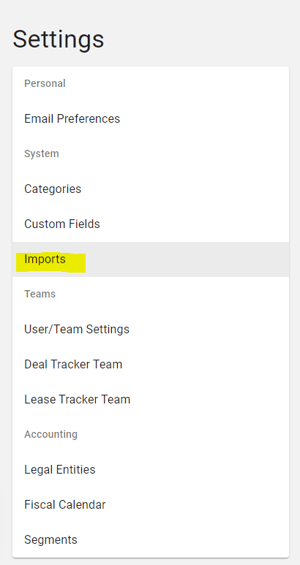
To get started, simply click on the "settings" option located in the top right corner under the profile icon.

Choose "Imports" from the settings menu.
### Importing Data
#### Import Templates
Once you have chosen "Imports" from the settings menu, you can proceed by selecting an Import template to download from the Data Templates window.
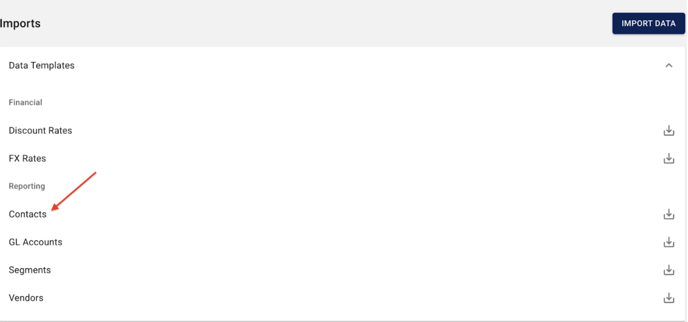
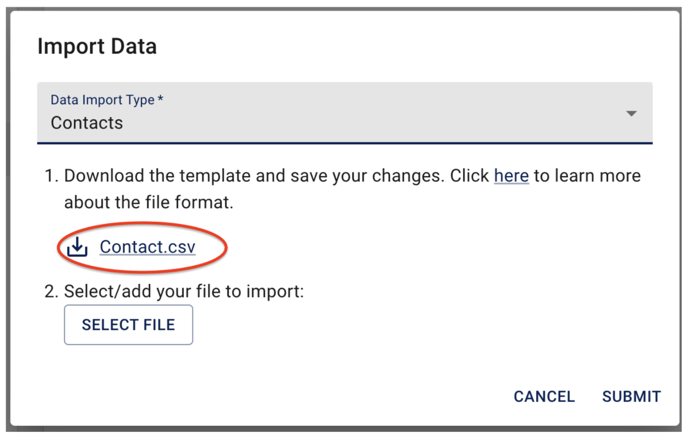
Or you have the option to select the Import Button and download a template from the Import window.

Select the import type
1. Download the template and save your changes \[Enter the information into the template and save file\]
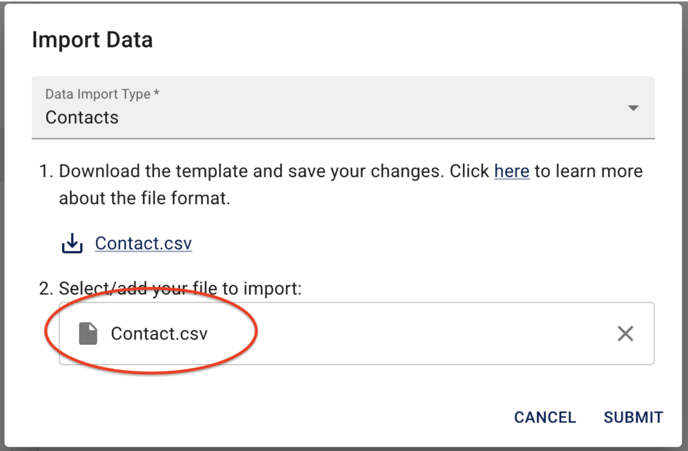
1. Select your file to import, then "submit".
#### Review Import Results
After the import process is finished, you will be able to examine the results in the import history table.
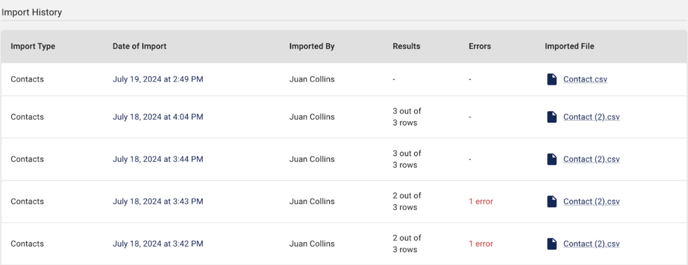
If there were any errors during the import, they will be indicated in the error column. To view more details about a specific import, click on the link in the Date of Import column.
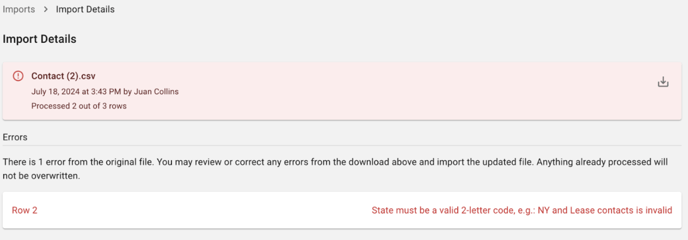
By clicking on the date of the import, the Import Details page will show you the import results, including any errors that occurred and the original import file. From here, you have the opportunity to review and correct any errors by downloading and importing an updated file with the necessary corrections. It's important to note that any records that have already been processed will not be overwritten.
- [Getting Started](https://help.occupier.com/knowledge/getting-started?hsLang=en#main-content)
- [The Basics](https://help.occupier.com/knowledge/getting-started?hsLang=en#the-basics)
- [Occupier Onboarding & Abstraction](https://help.occupier.com/knowledge/getting-started?hsLang=en#occupier-onboarding-abstraction)
- [User & Team Management](https://help.occupier.com/knowledge/getting-started?hsLang=en#user-team-management)
- [Email & Notification Management](https://help.occupier.com/knowledge/getting-started?hsLang=en#email-notification-management)
- [Custom Data Management](https://help.occupier.com/knowledge/getting-started?hsLang=en#custom-data-management)
- [Lease Administration](https://help.occupier.com/knowledge/lease-administration?hsLang=en#main-content)
- [Equipment Leases](https://help.occupier.com/knowledge/lease-administration?hsLang=en#equipment-leases)
- [Change History Log](https://help.occupier.com/knowledge/lease-administration?hsLang=en#change-history-log)
- [Clauses](https://help.occupier.com/knowledge/lease-administration?hsLang=en#clauses)
- [Document Storage](https://help.occupier.com/knowledge/lease-administration?hsLang=en#document-storage)
- [Financials](https://help.occupier.com/knowledge/lease-administration?hsLang=en#financials)
- [Creating & Editing a Lease](https://help.occupier.com/knowledge/lease-administration?hsLang=en#creating-editing-a-lease)
- [Critical Dates](https://help.occupier.com/knowledge/lease-administration?hsLang=en#critical-dates)
- [Lease Column Configurations](https://help.occupier.com/knowledge/lease-administration?hsLang=en#lease-column-configurations)
- [Custom Fields](https://help.occupier.com/knowledge/lease-administration?hsLang=en#custom-fields)
- [Contacts](https://help.occupier.com/knowledge/lease-administration?hsLang=en#contacts)
- [Filtering](https://help.occupier.com/knowledge/lease-administration?hsLang=en#filtering)
- [Assets](https://help.occupier.com/knowledge/lease-administration?hsLang=en#assets)
- [Lease Data Exports](https://help.occupier.com/knowledge/lease-administration?hsLang=en#lease-data-exports)
- [Occupier Analytics Dashboard](https://help.occupier.com/knowledge/lease-administration?hsLang=en#occupier-analytics-dashboard)
- [Customizing Data Categories](https://help.occupier.com/knowledge/lease-administration?hsLang=en#customizing-data-categories)
- [Lease Admin Overview](https://help.occupier.com/knowledge/lease-administration?hsLang=en#lease-admin-overview)
- [Column Configuration & Filtering](https://help.occupier.com/knowledge/lease-administration?hsLang=en#column-configuration-filtering)
- [Tasks & Commenting](https://help.occupier.com/knowledge/lease-administration?hsLang=en#tasks-commenting)
- [Lease Payables](https://help.occupier.com/knowledge/lease-administration?hsLang=en#lease-payables)
- [Lease Data Imports](https://help.occupier.com/knowledge/lease-administration?hsLang=en#lease-data-imports)
- [Percentage Rent](https://help.occupier.com/knowledge/lease-administration?hsLang=en#percentage-rent)
- [Lease Accounting](https://help.occupier.com/knowledge/lease-accounting?hsLang=en#main-content)
- [Understanding ASC 842, IFRS16, GASB87 and FRS102](https://help.occupier.com/knowledge/lease-accounting?hsLang=en#understanding-asc-842-ifrs16-gasb87-and-frs102)
- [Account Set-up](https://help.occupier.com/knowledge/lease-accounting?hsLang=en#account-set-up)
- [FX Rates](https://help.occupier.com/knowledge/lease-accounting?hsLang=en#fx-rates)
- [Recognizing a Lease](https://help.occupier.com/knowledge/lease-accounting?hsLang=en#recognizing-a-lease)
- [Impairing a Lease](https://help.occupier.com/knowledge/lease-accounting?hsLang=en#impairing-a-lease)
- [Lease Modifications](https://help.occupier.com/knowledge/lease-accounting?hsLang=en#lease-modifications)
- [Lease Accounting Reporting](https://help.occupier.com/knowledge/lease-accounting?hsLang=en#lease-accounting-reporting)
- [Importing Data Into Accounting](https://help.occupier.com/knowledge/lease-accounting?hsLang=en#importing-data-into-accounting)
- [Allocations](https://help.occupier.com/knowledge/lease-accounting?hsLang=en#allocations)
- [Close Books Process](https://help.occupier.com/knowledge/lease-accounting?hsLang=en#close-books-process)
- [NetSuite Journal Entry Integrations](https://help.occupier.com/knowledge/lease-accounting?hsLang=en#netsuite-journal-entry-integrations)
- [Transaction Management](https://help.occupier.com/knowledge/transaction-management?hsLang=en#main-content)
- [Task Templates](https://help.occupier.com/knowledge/transaction-management?hsLang=en#task-templates)
- [Filtering](https://help.occupier.com/knowledge/transaction-management?hsLang=en#filtering)
- [Custom Categories](https://help.occupier.com/knowledge/transaction-management?hsLang=en#custom-categories)
- [Deal Column Configurations](https://help.occupier.com/knowledge/transaction-management?hsLang=en#deal-column-configurations)
- [Documents](https://help.occupier.com/knowledge/transaction-management?hsLang=en#documents)
- [Comps](https://help.occupier.com/knowledge/transaction-management?hsLang=en#comps)
- [Deal Stages](https://help.occupier.com/knowledge/transaction-management?hsLang=en#deal-stages)
- [Creating & Editing a Deal](https://help.occupier.com/knowledge/transaction-management?hsLang=en#creating-editing-a-deal)
- [Site Selection](https://help.occupier.com/knowledge/transaction-management?hsLang=en#site-selection)
- [Broker Deals CRM](https://help.occupier.com/knowledge/broker-deals-crm?hsLang=en#main-content)
- [Custom Deal Stages](https://help.occupier.com/knowledge/broker-deals-crm?hsLang=en#custom-deal-stages)
- [Custom Fields](https://help.occupier.com/knowledge/broker-deals-crm?hsLang=en#custom-fields)
- [Broker Deal Exports](https://help.occupier.com/knowledge/broker-deals-crm?hsLang=en#broker-deal-exports)
- [Broker Digest emails](https://help.occupier.com/knowledge/broker-deals-crm?hsLang=en#broker-digest-emails)
- [Critical Date Columns](https://help.occupier.com/knowledge/broker-deals-crm?hsLang=en#critical-date-columns)
- [Creating & Editing a Deal](https://help.occupier.com/knowledge/broker-deals-crm?hsLang=en#creating-editing-a-deal)
- [Comps](https://help.occupier.com/knowledge/broker-deals-crm?hsLang=en#comps)
- [Site Selection](https://help.occupier.com/knowledge/broker-deals-crm?hsLang=en#site-selection)
- [Broker Deal Teams](https://help.occupier.com/knowledge/broker-deals-crm?hsLang=en#broker-deal-teams)
- [Negotiations & Proposals](https://help.occupier.com/knowledge/broker-deals-crm?hsLang=en#negotiations-proposals)
- [Clients Tab](https://help.occupier.com/knowledge/broker-deals-crm?hsLang=en#clients-tab)
- [Monthly Release Notes](https://help.occupier.com/knowledge/monthly-release-notes?hsLang=en#main-content)
- [2025 Product Release Notes](https://help.occupier.com/knowledge/monthly-release-notes?hsLang=en#2025-product-release-notes)
- [2024 Product Release Notes](https://help.occupier.com/knowledge/monthly-release-notes?hsLang=en#2024-product-release-notes)
- [2026 Product Release Notes](https://help.occupier.com/knowledge/monthly-release-notes?hsLang=en#2026-product-release-notes)
[](https://www.occupier.com)
[mailto:email@email.com](mailto:email@email.com)
Copyright © 2026, Occupier