---
title: How do I generate a Roll Forward Report in Occupier?
description: Roll Forward reporting, tracks the changes in the ROU Asset and Lease Liability balances based on the lease activities that occur in a lease’s life cycle.
---
[Skip to content](https://help.occupier.com/knowledge/how-do-i-generate-a-roll-forward-report-in-occupier#main-content)
English
Show submenu for translations
[Customer portal](https://help.occupier.com/tickets-view?hsLang=en)
![H-Teal (1).svg\]](https://help.occupier.com/hubfs/H-Teal%20(1).svg)
- [Tickets](https://3455891.hs-sites.com/tickets-view)
- [Sign out](https://3455891.hs-sites.com/_hcms/mem/logout)
Open main navigation
Close main navigation
- [Tickets](https://3455891.hs-sites.com/tickets-view)
- [Sign out](https://3455891.hs-sites.com/_hcms/mem/logout)
- English
Show submenu for translations
- [Customer portal](https://help.occupier.com/tickets-view)
Hi there! How can we help?
- There are no suggestions because the search field is empty.
1. [Help Center](https://help.occupier.com/knowledge?hsLang=en)
2. [Lease Accounting](https://help.occupier.com/knowledge/lease-accounting?hsLang=en)
3. [Lease Accounting Reporting](https://help.occupier.com/knowledge/lease-accounting?hsLang=en#lease-accounting-reporting)
# How do I generate a Roll Forward Report in Occupier?
## Occupier provides a robust, audit ready report that summarizes the roll forward balances for ROU Assets and Lease Liabilities and include the supporting journal entry transactions from your leases within the report.
### Generating the Roll Forward report
Begin by selecting "[Roll Forward](https://help.occupier.com/knowledge/what-is-a-roll-forward-report?hsLang=en)" from the Lease Accounting navigation bar. **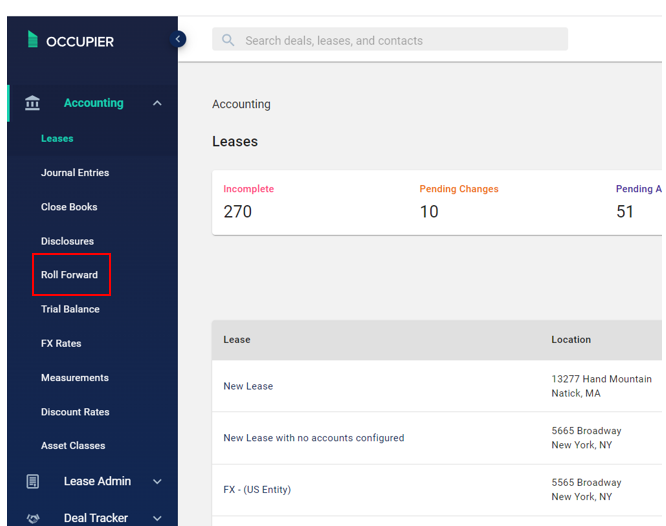**
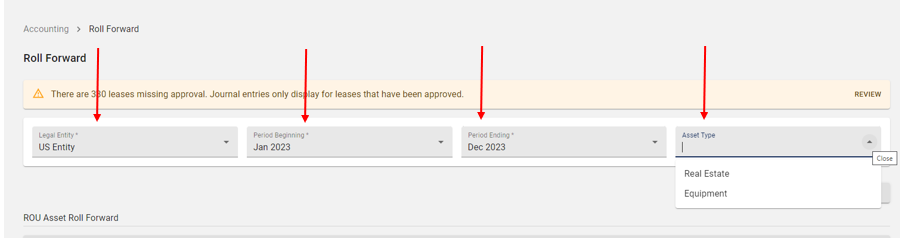
To generate the report, simply provide the legal entity, the desired beginning and ending fiscal periods and specify the asset type if applicable (such as real estate or equipment). If you leave the asset type blank, the report will include results for all asset types.
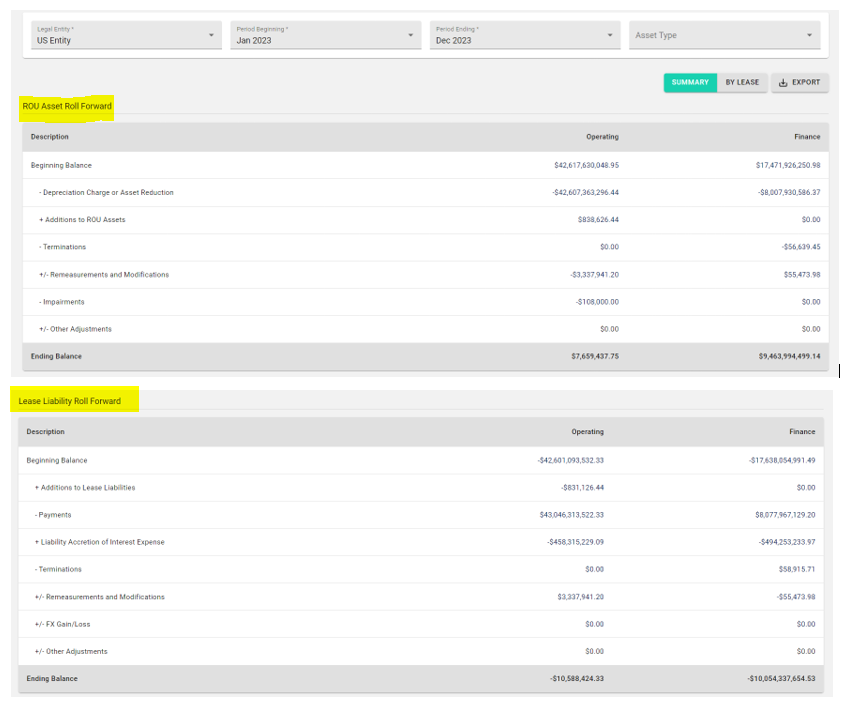
The generated results will provide a summary of the balances for ROU Assets and Lease Liabilities.
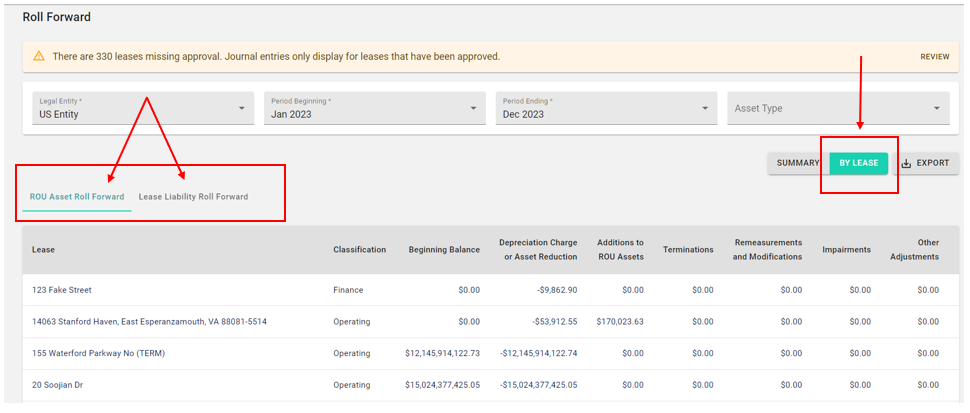
To view the results by lease, simply select the "By Lease" option. This will display the roll forward results categorized by lease. You can easily switch between views by selecting the ROU Asset or Lease Liability tabs.
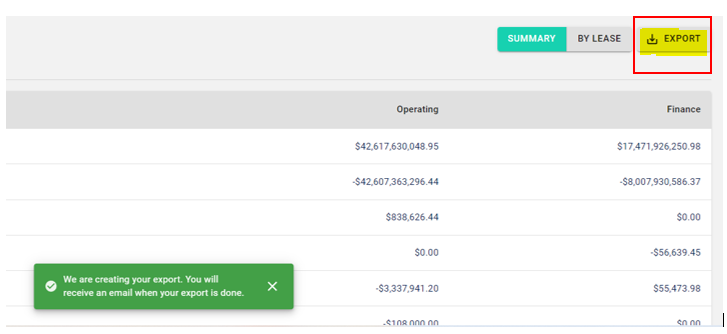
To export the Roll Forward report to Excel, simply click on the "Export" button. You will be notified via email once your export is complete.
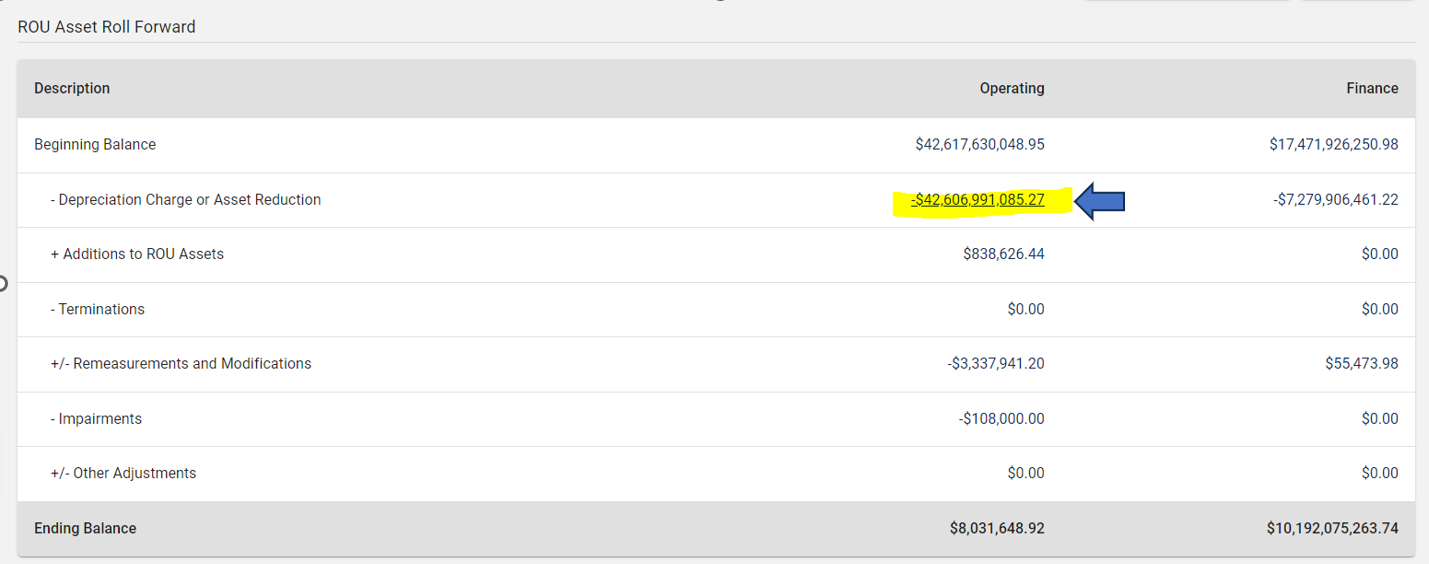
Each item displayed in the app includes a link to the journal entry transactions that substantiate each balance. To view the journal entries for any balance displayed, simply click on the link.
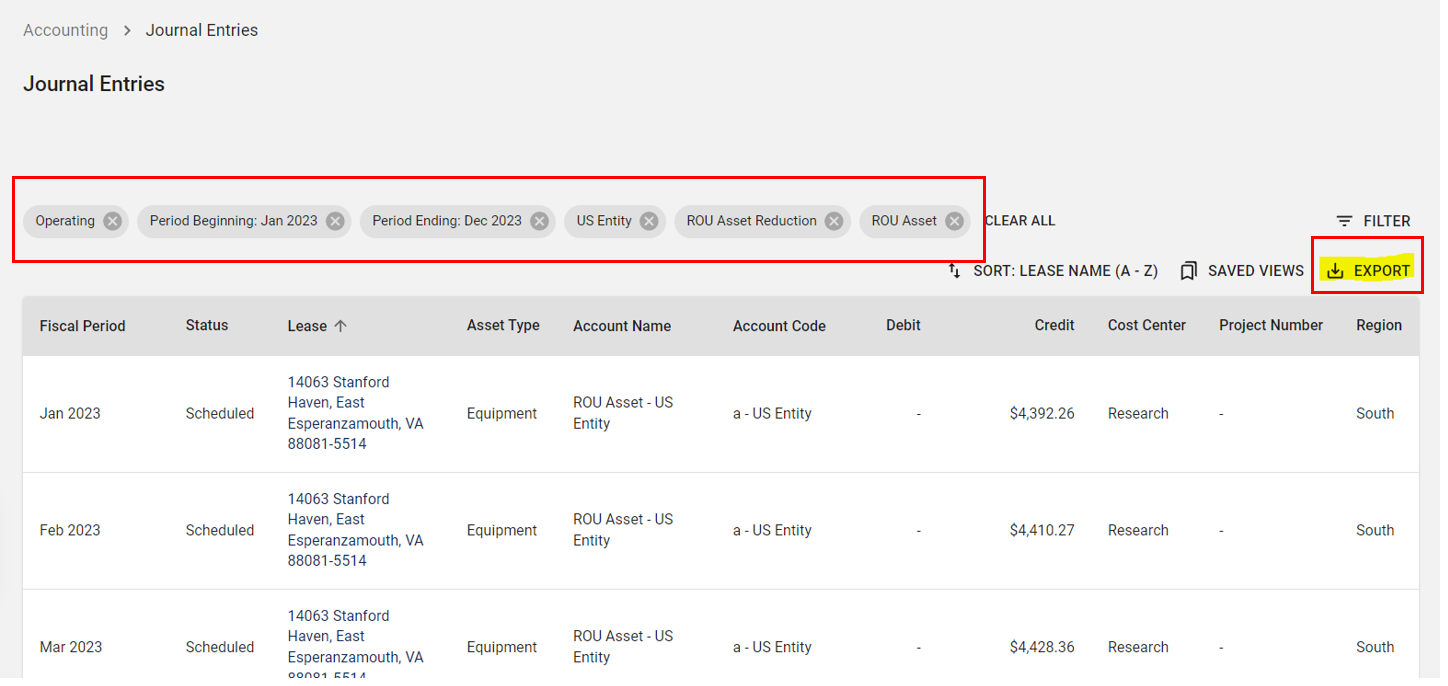
The journal entry transactions that support each balance will display. These transactions are filtered based on lease classification type, fiscal periods, legal entity, and transaction type. To download the transactions to Excel, select the export option.
### Reviewing the Roll Forward report
#### Roll Forward summary and supporting transactions
Similar to the Occupier application view, upon opening the Excel export, you will discover the initial "Summary" tab that presents a comprehensive overview of the Roll Forward.
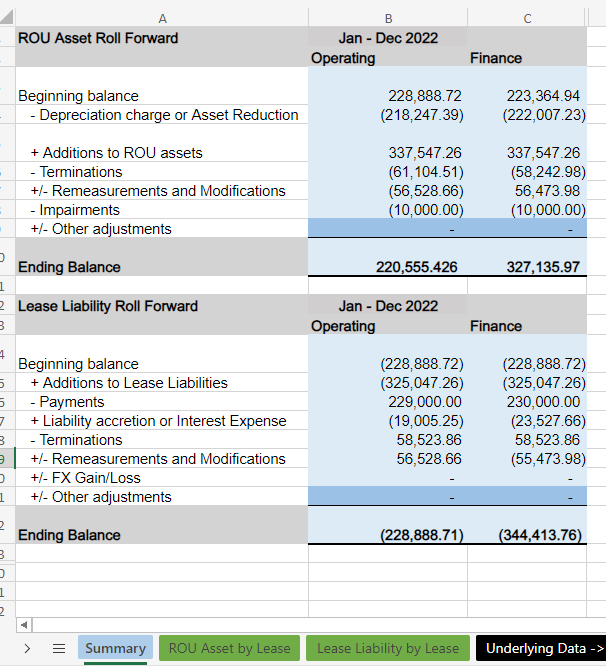
Each line item within the summary includes a corresponding tab showcasing the journal entry transactions that substantiate each balance.


#### Roll Forward by Lease
Additional roll forward tabs include the ROU Asset and the Lease Liability, which are both organized by lease.


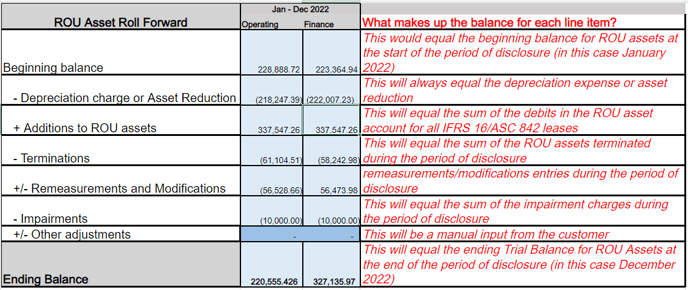
### How are the line items in the Roll Forward calculated?
Here is a helpful guide that offers an explanation of the displayed line items and their corresponding journal entries for each line:

- [Getting Started](https://help.occupier.com/knowledge/getting-started?hsLang=en#main-content)
- [The Basics](https://help.occupier.com/knowledge/getting-started?hsLang=en#the-basics)
- [Occupier Onboarding & Abstraction](https://help.occupier.com/knowledge/getting-started?hsLang=en#occupier-onboarding-abstraction)
- [User & Team Management](https://help.occupier.com/knowledge/getting-started?hsLang=en#user-team-management)
- [Email & Notification Management](https://help.occupier.com/knowledge/getting-started?hsLang=en#email-notification-management)
- [Custom Data Management](https://help.occupier.com/knowledge/getting-started?hsLang=en#custom-data-management)
- [Lease Administration](https://help.occupier.com/knowledge/lease-administration?hsLang=en#main-content)
- [Equipment Leases](https://help.occupier.com/knowledge/lease-administration?hsLang=en#equipment-leases)
- [Change History Log](https://help.occupier.com/knowledge/lease-administration?hsLang=en#change-history-log)
- [Clauses](https://help.occupier.com/knowledge/lease-administration?hsLang=en#clauses)
- [Document Storage](https://help.occupier.com/knowledge/lease-administration?hsLang=en#document-storage)
- [Financials](https://help.occupier.com/knowledge/lease-administration?hsLang=en#financials)
- [Creating & Editing a Lease](https://help.occupier.com/knowledge/lease-administration?hsLang=en#creating-editing-a-lease)
- [Critical Dates](https://help.occupier.com/knowledge/lease-administration?hsLang=en#critical-dates)
- [Lease Column Configurations](https://help.occupier.com/knowledge/lease-administration?hsLang=en#lease-column-configurations)
- [Custom Fields](https://help.occupier.com/knowledge/lease-administration?hsLang=en#custom-fields)
- [Contacts](https://help.occupier.com/knowledge/lease-administration?hsLang=en#contacts)
- [Filtering](https://help.occupier.com/knowledge/lease-administration?hsLang=en#filtering)
- [Assets](https://help.occupier.com/knowledge/lease-administration?hsLang=en#assets)
- [Lease Data Exports](https://help.occupier.com/knowledge/lease-administration?hsLang=en#lease-data-exports)
- [Occupier Analytics Dashboard](https://help.occupier.com/knowledge/lease-administration?hsLang=en#occupier-analytics-dashboard)
- [Customizing Data Categories](https://help.occupier.com/knowledge/lease-administration?hsLang=en#customizing-data-categories)
- [Lease Admin Overview](https://help.occupier.com/knowledge/lease-administration?hsLang=en#lease-admin-overview)
- [Column Configuration & Filtering](https://help.occupier.com/knowledge/lease-administration?hsLang=en#column-configuration-filtering)
- [Tasks & Commenting](https://help.occupier.com/knowledge/lease-administration?hsLang=en#tasks-commenting)
- [Lease Payables](https://help.occupier.com/knowledge/lease-administration?hsLang=en#lease-payables)
- [Lease Data Imports](https://help.occupier.com/knowledge/lease-administration?hsLang=en#lease-data-imports)
- [Percentage Rent](https://help.occupier.com/knowledge/lease-administration?hsLang=en#percentage-rent)
- [Lease Accounting](https://help.occupier.com/knowledge/lease-accounting?hsLang=en#main-content)
- [Understanding ASC 842, IFRS16, GASB87 and FRS102](https://help.occupier.com/knowledge/lease-accounting?hsLang=en#understanding-asc-842-ifrs16-gasb87-and-frs102)
- [Account Set-up](https://help.occupier.com/knowledge/lease-accounting?hsLang=en#account-set-up)
- [FX Rates](https://help.occupier.com/knowledge/lease-accounting?hsLang=en#fx-rates)
- [Recognizing a Lease](https://help.occupier.com/knowledge/lease-accounting?hsLang=en#recognizing-a-lease)
- [Impairing a Lease](https://help.occupier.com/knowledge/lease-accounting?hsLang=en#impairing-a-lease)
- [Lease Modifications](https://help.occupier.com/knowledge/lease-accounting?hsLang=en#lease-modifications)
- [Lease Accounting Reporting](https://help.occupier.com/knowledge/lease-accounting?hsLang=en#lease-accounting-reporting)
- [Importing Data Into Accounting](https://help.occupier.com/knowledge/lease-accounting?hsLang=en#importing-data-into-accounting)
- [Allocations](https://help.occupier.com/knowledge/lease-accounting?hsLang=en#allocations)
- [Close Books Process](https://help.occupier.com/knowledge/lease-accounting?hsLang=en#close-books-process)
- [NetSuite Journal Entry Integrations](https://help.occupier.com/knowledge/lease-accounting?hsLang=en#netsuite-journal-entry-integrations)
- [Transaction Management](https://help.occupier.com/knowledge/transaction-management?hsLang=en#main-content)
- [Task Templates](https://help.occupier.com/knowledge/transaction-management?hsLang=en#task-templates)
- [Filtering](https://help.occupier.com/knowledge/transaction-management?hsLang=en#filtering)
- [Custom Categories](https://help.occupier.com/knowledge/transaction-management?hsLang=en#custom-categories)
- [Deal Column Configurations](https://help.occupier.com/knowledge/transaction-management?hsLang=en#deal-column-configurations)
- [Documents](https://help.occupier.com/knowledge/transaction-management?hsLang=en#documents)
- [Comps](https://help.occupier.com/knowledge/transaction-management?hsLang=en#comps)
- [Deal Stages](https://help.occupier.com/knowledge/transaction-management?hsLang=en#deal-stages)
- [Creating & Editing a Deal](https://help.occupier.com/knowledge/transaction-management?hsLang=en#creating-editing-a-deal)
- [Site Selection](https://help.occupier.com/knowledge/transaction-management?hsLang=en#site-selection)
- [Broker Deals CRM](https://help.occupier.com/knowledge/broker-deals-crm?hsLang=en#main-content)
- [Custom Deal Stages](https://help.occupier.com/knowledge/broker-deals-crm?hsLang=en#custom-deal-stages)
- [Custom Fields](https://help.occupier.com/knowledge/broker-deals-crm?hsLang=en#custom-fields)
- [Broker Deal Exports](https://help.occupier.com/knowledge/broker-deals-crm?hsLang=en#broker-deal-exports)
- [Broker Digest emails](https://help.occupier.com/knowledge/broker-deals-crm?hsLang=en#broker-digest-emails)
- [Critical Date Columns](https://help.occupier.com/knowledge/broker-deals-crm?hsLang=en#critical-date-columns)
- [Creating & Editing a Deal](https://help.occupier.com/knowledge/broker-deals-crm?hsLang=en#creating-editing-a-deal)
- [Comps](https://help.occupier.com/knowledge/broker-deals-crm?hsLang=en#comps)
- [Site Selection](https://help.occupier.com/knowledge/broker-deals-crm?hsLang=en#site-selection)
- [Broker Deal Teams](https://help.occupier.com/knowledge/broker-deals-crm?hsLang=en#broker-deal-teams)
- [Negotiations & Proposals](https://help.occupier.com/knowledge/broker-deals-crm?hsLang=en#negotiations-proposals)
- [Clients Tab](https://help.occupier.com/knowledge/broker-deals-crm?hsLang=en#clients-tab)
- [Monthly Release Notes](https://help.occupier.com/knowledge/monthly-release-notes?hsLang=en#main-content)
- [2025 Product Release Notes](https://help.occupier.com/knowledge/monthly-release-notes?hsLang=en#2025-product-release-notes)
- [2024 Product Release Notes](https://help.occupier.com/knowledge/monthly-release-notes?hsLang=en#2024-product-release-notes)
- [2026 Product Release Notes](https://help.occupier.com/knowledge/monthly-release-notes?hsLang=en#2026-product-release-notes)
[](https://www.occupier.com)
[mailto:email@email.com](mailto:email@email.com)
Copyright © 2026, Occupier