---
title: AI Responsibilities Mapping
description: Turn lease clauses into structured, queryable landlord and tenant responsibilities
---
[Skip to content](https://help.occupier.com/knowledge/ai-responsibilities-mapping#main-content)
English
Show submenu for translations
[Customer portal](https://help.occupier.com/tickets-view?hsLang=en)
![H-Teal (1).svg\]](https://help.occupier.com/hubfs/H-Teal%20(1).svg)
- [Tickets](https://3455891.hs-sites.com/tickets-view)
- [Sign out](https://3455891.hs-sites.com/_hcms/mem/logout)
Open main navigation
Close main navigation
- [Tickets](https://3455891.hs-sites.com/tickets-view)
- [Sign out](https://3455891.hs-sites.com/_hcms/mem/logout)
- English
Show submenu for translations
- [Customer portal](https://help.occupier.com/tickets-view)
Hi there! How can we help?
- There are no suggestions because the search field is empty.
1. [Help Center](https://help.occupier.com/knowledge?hsLang=en)
2. [Lease Administration](https://help.occupier.com/knowledge/lease-administration?hsLang=en)
3. [Clauses](https://help.occupier.com/knowledge/lease-administration?hsLang=en#clauses)
# AI Responsibilities Mapping
## Turn lease clauses into structured, queryable landlord and tenant responsibilities
**Overview**
AI Responsibilities Mapping uses a large language model to read lease clause language and propose the specific landlord and tenant responsibilities it contains. After a quick user review, accepted responsibilities are saved to the lease as structured records, themed and tagged so they can be filtered and reported on across the entire portfolio.
Unlike AI Clause Intelligence, which produces summary text for reading, Responsibilities Mapping produces structured data. That data drives portfolio-level queries such as "which leases make the landlord responsible for HVAC repairs?" without re-reading clause text.
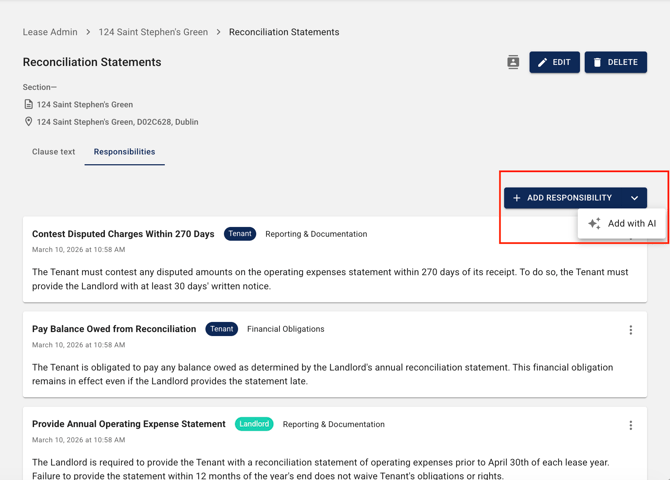
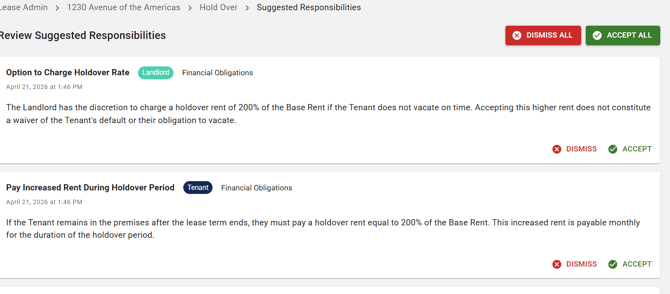
**What Gets Extracted**
For any clause, AI Responsibilities Mapping can propose:
- Landlord responsibilities identified in the clause text
- Tenant responsibilities identified in the clause text
- An auto-detected theme for each responsibility (for example, Maintenance, CAM, Insurance, Utilities, HVAC, Structural, Parking, Signage)
- Tags that link related responsibilities across clauses and leases
| **Note:** All AI proposals are suggestions only. Nothing is saved to the lease until you accept it. You stay in control of what enters your portfolio data. |
| --- |
**What Is Not Included**
- Responsibilities on leases you do not have permission to view
- Automatic extraction without user review (accept or reject is always required)
- Responsibilities extracted from attachments, exhibits, or other non-clause documents
**Responsibility Record Format**
Each accepted responsibility is saved as a structured record on the lease with the following fields:
| **Field** | **Content** |
| --- | --- |
| Party | Landlord or Tenant |
| Description | Short, action-oriented statement of the obligation (for example, "Maintain and repair HVAC system") |
| Theme | Auto-detected category (Maintenance, CAM, Insurance, Utilities, HVAC, Structural, Parking, Signage, etc.); user-editable |
| Tags | Optional tags to group related responsibilities (e.g., "capital improvements", "reconciliation") |
| Source clause | Link back to the originating clause for full context |
| Lease | Lease and property the responsibility is tied to |
| Origin | Flagged as AI-generated or manually added |
****
**How to Generate Responsibilities from a Clause**
You can generate responsibilities for any clause with clause text entered in Occupier. The workflow is the same whether you are setting up a new lease or revisiting an existing one.
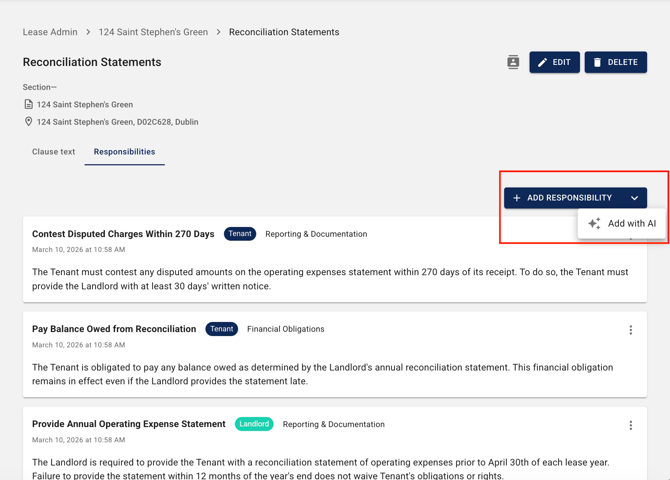
**Step 1: Open the Lease and Navigate to the Clauses Tab**
From the left navigation, open Leases, select the lease, and click the Clauses tab.
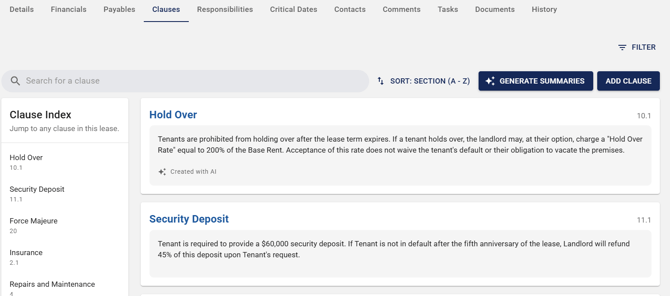
**Step 2: Click 'Generate with AI' on the Clause**
Find the clause you want to extract responsibilities from and click Generate with AI. The LLM analyzes the clause text and proposes landlord and tenant responsibilities it identifies.
**
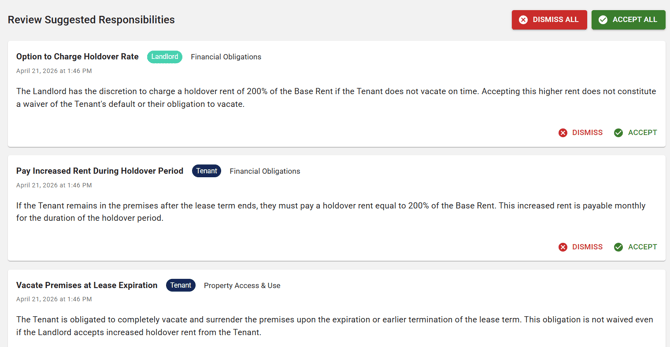
Step 3: Review Each Proposed Responsibility**
Each proposal is listed with its party, description, and auto-detected theme. For every proposal you can:
- Accept - saves the responsibility as a structured record on the lease
- Reject - discards the proposal; it is not saved
|  |
| --- |
**Step 4: Save**
Once you have accepted the responsibilities you want, they appear on the lease and are added to the portfolio-wide Responsibilities Index. You can regenerate at any time to propose a fresh set of responsibilities for a clause.
**Adding a Responsibility Manually**
AI is an optional enhancement. You can add a responsibility directly on a clause by clicking Add Responsibility and entering the party, description, theme, and any tags. Manually added responsibilities behave identically to AI-generated ones in the Index and in reporting.
**The Responsibilities Index**
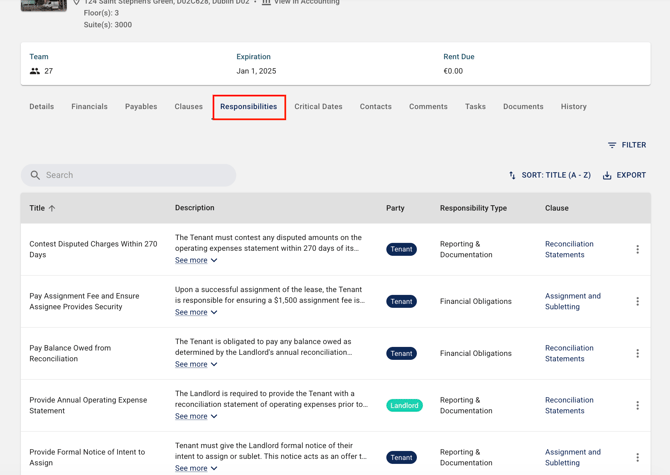
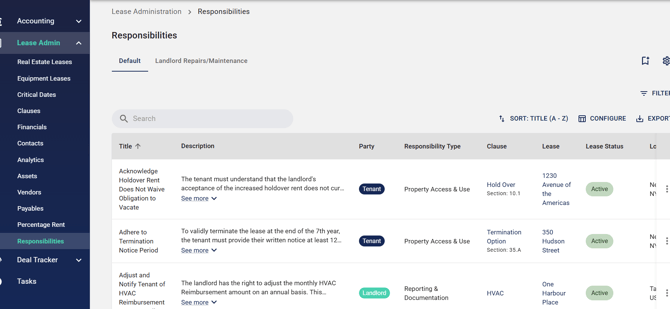
The Responsibilities Index is a portfolio-wide page that lists every accepted responsibility across every lease you have access to. Use it to answer portfolio-level questions in seconds instead of re-reading clauses.
- See every landlord and tenant responsibility across the portfolio in a single view
- Filter by theme, tag, party, lease, property, or any combination
- Open any responsibility to jump back to the source clause and lease
- Export filtered results for reporting, renewal prep, or landlord negotiations
**Available Filters**
The Responsibilities Index supports the following filters, which can be combined:
| **Filter** | **Description** |
| --- | --- |
| Party | Landlord or Tenant |
| Theme | Auto-detected or user-defined category (Maintenance, CAM, Insurance, HVAC, etc.) |
| Tag | Any custom tag applied to the responsibility |
| Lease | Limit results to one or more specific leases |
| Property / Location | Filter by property, city, state, or country |
| Lessee / Lessor | Filter by lease party |
| Origin | AI-generated, manually added, or both |
**Configuring Responsibility Categories**
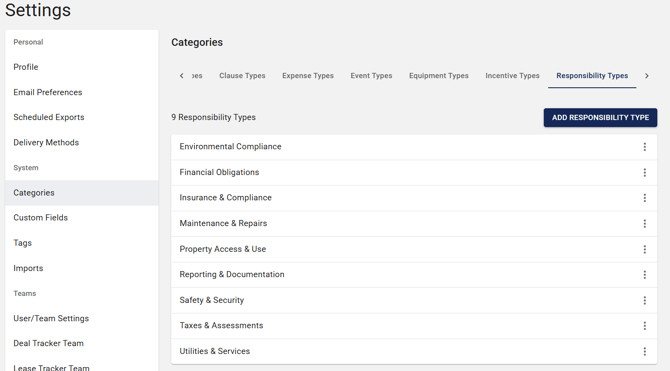
Account Administrators can customize the themes and tags available to end users under Settings. This lets your team adapt Responsibilities Mapping to your internal taxonomy.
- Add new themes or tags specific to your portfolio
- Edit the name of existing themes or tags
- Delete themes or tags that are no longer in use
| **Important:** Deleting a theme or tag does not delete the underlying responsibility records. Any affected records are unassigned and can be re-categorized in bulk from the Responsibilities Index. |
| --- |
|  |
**How Responsibilities Stay Current**
- Clause text updated in Occupier -\> existing responsibilities remain in place; regenerate with AI to propose a fresh set
- User edits a responsibility -\> the record is updated in place and remains linked to its source clause
- Clause deleted -\> associated responsibilities are removed with it
- Responsibility rejected or deleted -\> removed from the lease and the portfolio Responsibilities Index
| **Important:** Responsibilities are not re-extracted automatically when clause text changes. After a material edit, open the clause and regenerate to pick up the new language. |
| --- |
**Accuracy and User Oversight**
AI Responsibilities Mapping is built around an explicit review step. You stay in control of what becomes structured data in your portfolio.
- Nothing is saved without acceptance - every proposal must be explicitly accepted by a user
- Editable before acceptance - adjust wording, party, theme, or tags on any proposal
- Editable after acceptance - update any saved responsibility record at any time
- Regenerate at any time - re-run AI on a clause to propose a fresh set of responsibilities
- Manual entry supported - skip AI entirely and add responsibilities by hand when preferred
| **Important:** AI proposals accelerate extraction; they do not replace review. For responsibilities tied to material financial or legal decisions, always confirm against the source clause before acting. |
| --- |
**Managing Your Responsibilities**
**Editing a Saved Responsibility**
Open the responsibility from the lease Clauses tab or the Responsibilities Index and click Edit. Update any field and save. Changes are reflected everywhere the responsibility is displayed.
**Deleting a Responsibility**
Open the responsibility and click Delete. The record is removed from the lease and the Responsibilities Index. This action cannot be undone; if the responsibility was AI-generated, you can re-propose it by regenerating on the source clause.
**Bulk Re-categorizing Responsibilities**
From the Responsibilities Index, filter to the set of records you want to update, select them, and use the bulk actions menu to change theme, add tags, or delete. Useful when retiring a legacy theme or consolidating overlapping categories.
**Turning the Feature Off at the Account Level**
AI Responsibilities Mapping is enabled by default for all accounts at no additional cost. Account Administrators who prefer not to expose the feature can disable it by contacting your Account Manager. Existing responsibility records remain intact; the Generate with AI action is hidden from all users.
**Frequently Asked Questions**
**What responsibility themes does AI auto-detect?**
AI assigns a theme based on clause content. Common themes include Maintenance, CAM, Insurance, Utilities, Repairs, Structural, HVAC, Parking, and Signage. Themes are user-editable, and Account Administrators can add or remove themes in Settings.
**Can users manually add responsibilities without using AI?**
Yes. Any user with edit access to a lease can add a responsibility by hand using the Add Responsibility action on a clause. Manual records behave identically to AI-generated records in the Responsibilities Index.
**What happens when I reject an AI-proposed responsibility?**
Rejected proposals are discarded and never saved to the lease. They do not appear in the Responsibilities Index. You can regenerate AI proposals at any time or add a responsibility manually instead.
**Is there a limit to how many responsibilities can be extracted from one clause?**
No. AI will propose as many landlord and tenant responsibilities as it identifies in the clause text. You choose which ones to accept.
**Does the Responsibilities Index replace an existing feature?**
No. The Responsibilities Index is a net-new portfolio-level page. It does not replace clauses, lease views, or any existing reporting.
**Does AI Responsibilities Mapping work on clauses entered before the feature launched?**
Yes. The feature can be run on any clause in Occupier regardless of when it was entered. Existing customers can generate responsibilities retroactively across their entire clause library.
**Can I edit a responsibility after it is saved?**
Yes. Any user with edit access to the lease can modify the description, party, theme, or tags on an accepted responsibility. Edits are reflected in the Responsibilities Index immediately.
**Will my teammates see the responsibilities I accept?**
Yes. Accepted responsibilities are saved to the lease, so any user with permission to view the lease will see them on the clause and in the Responsibilities Index.
**Is AI Responsibilities Mapping included in my plan?**
Yes. The feature is included in all Occupier tiers at no additional cost.
**How accurate is the AI extraction?**
AI is trained on a broad corpus of commercial lease language and standardizes interpretation across reviewers. Because every proposal is reviewed and explicitly accepted, accuracy is ultimately controlled by the user. For material financial or legal decisions, confirm against the source clause before acting.
**Can my Admin turn AI Responsibilities Mapping off?**
Yes. Account Administrators can disable the feature by contacting their account manager. Existing responsibility records remain intact; the Generate with AI action is hidden for all users in the account.
**Related Articles**
- AI Clause Intelligence - generate instant summaries of dense clause language
- Entering and Managing Clauses in Occupier
- Portfolio Clauses Tab - Filtering and Reporting
**Need Help?**
If you have questions or encounter any issues with AI Responsibilities Mapping, contact the Occupier Customer Success team:
**Email:** customersuccess@occupier.com
- [Getting Started](https://help.occupier.com/knowledge/getting-started?hsLang=en#main-content)
- [The Basics](https://help.occupier.com/knowledge/getting-started?hsLang=en#the-basics)
- [Occupier Onboarding & Abstraction](https://help.occupier.com/knowledge/getting-started?hsLang=en#occupier-onboarding-abstraction)
- [User & Team Management](https://help.occupier.com/knowledge/getting-started?hsLang=en#user-team-management)
- [Email & Notification Management](https://help.occupier.com/knowledge/getting-started?hsLang=en#email-notification-management)
- [Custom Data Management](https://help.occupier.com/knowledge/getting-started?hsLang=en#custom-data-management)
- [Lease Administration](https://help.occupier.com/knowledge/lease-administration?hsLang=en#main-content)
- [Equipment Leases](https://help.occupier.com/knowledge/lease-administration?hsLang=en#equipment-leases)
- [Change History Log](https://help.occupier.com/knowledge/lease-administration?hsLang=en#change-history-log)
- [Clauses](https://help.occupier.com/knowledge/lease-administration?hsLang=en#clauses)
- [Document Storage](https://help.occupier.com/knowledge/lease-administration?hsLang=en#document-storage)
- [Financials](https://help.occupier.com/knowledge/lease-administration?hsLang=en#financials)
- [Creating & Editing a Lease](https://help.occupier.com/knowledge/lease-administration?hsLang=en#creating-editing-a-lease)
- [Critical Dates](https://help.occupier.com/knowledge/lease-administration?hsLang=en#critical-dates)
- [Lease Column Configurations](https://help.occupier.com/knowledge/lease-administration?hsLang=en#lease-column-configurations)
- [Custom Fields](https://help.occupier.com/knowledge/lease-administration?hsLang=en#custom-fields)
- [Contacts](https://help.occupier.com/knowledge/lease-administration?hsLang=en#contacts)
- [Filtering](https://help.occupier.com/knowledge/lease-administration?hsLang=en#filtering)
- [Assets](https://help.occupier.com/knowledge/lease-administration?hsLang=en#assets)
- [Lease Data Exports](https://help.occupier.com/knowledge/lease-administration?hsLang=en#lease-data-exports)
- [Occupier Analytics Dashboard](https://help.occupier.com/knowledge/lease-administration?hsLang=en#occupier-analytics-dashboard)
- [Customizing Data Categories](https://help.occupier.com/knowledge/lease-administration?hsLang=en#customizing-data-categories)
- [Lease Admin Overview](https://help.occupier.com/knowledge/lease-administration?hsLang=en#lease-admin-overview)
- [Column Configuration & Filtering](https://help.occupier.com/knowledge/lease-administration?hsLang=en#column-configuration-filtering)
- [Tasks & Commenting](https://help.occupier.com/knowledge/lease-administration?hsLang=en#tasks-commenting)
- [Lease Payables](https://help.occupier.com/knowledge/lease-administration?hsLang=en#lease-payables)
- [Lease Data Imports](https://help.occupier.com/knowledge/lease-administration?hsLang=en#lease-data-imports)
- [Percentage Rent](https://help.occupier.com/knowledge/lease-administration?hsLang=en#percentage-rent)
- [Lease Accounting](https://help.occupier.com/knowledge/lease-accounting?hsLang=en#main-content)
- [Understanding ASC 842, IFRS16, GASB87 and FRS102](https://help.occupier.com/knowledge/lease-accounting?hsLang=en#understanding-asc-842-ifrs16-gasb87-and-frs102)
- [Account Set-up](https://help.occupier.com/knowledge/lease-accounting?hsLang=en#account-set-up)
- [FX Rates](https://help.occupier.com/knowledge/lease-accounting?hsLang=en#fx-rates)
- [Recognizing a Lease](https://help.occupier.com/knowledge/lease-accounting?hsLang=en#recognizing-a-lease)
- [Impairing a Lease](https://help.occupier.com/knowledge/lease-accounting?hsLang=en#impairing-a-lease)
- [Lease Modifications](https://help.occupier.com/knowledge/lease-accounting?hsLang=en#lease-modifications)
- [Lease Accounting Reporting](https://help.occupier.com/knowledge/lease-accounting?hsLang=en#lease-accounting-reporting)
- [Importing Data Into Accounting](https://help.occupier.com/knowledge/lease-accounting?hsLang=en#importing-data-into-accounting)
- [Allocations](https://help.occupier.com/knowledge/lease-accounting?hsLang=en#allocations)
- [Close Books Process](https://help.occupier.com/knowledge/lease-accounting?hsLang=en#close-books-process)
- [NetSuite Journal Entry Integrations](https://help.occupier.com/knowledge/lease-accounting?hsLang=en#netsuite-journal-entry-integrations)
- [Transaction Management](https://help.occupier.com/knowledge/transaction-management?hsLang=en#main-content)
- [Task Templates](https://help.occupier.com/knowledge/transaction-management?hsLang=en#task-templates)
- [Filtering](https://help.occupier.com/knowledge/transaction-management?hsLang=en#filtering)
- [Custom Categories](https://help.occupier.com/knowledge/transaction-management?hsLang=en#custom-categories)
- [Deal Column Configurations](https://help.occupier.com/knowledge/transaction-management?hsLang=en#deal-column-configurations)
- [Documents](https://help.occupier.com/knowledge/transaction-management?hsLang=en#documents)
- [Comps](https://help.occupier.com/knowledge/transaction-management?hsLang=en#comps)
- [Deal Stages](https://help.occupier.com/knowledge/transaction-management?hsLang=en#deal-stages)
- [Creating & Editing a Deal](https://help.occupier.com/knowledge/transaction-management?hsLang=en#creating-editing-a-deal)
- [Site Selection](https://help.occupier.com/knowledge/transaction-management?hsLang=en#site-selection)
- [Broker Deals CRM](https://help.occupier.com/knowledge/broker-deals-crm?hsLang=en#main-content)
- [Custom Deal Stages](https://help.occupier.com/knowledge/broker-deals-crm?hsLang=en#custom-deal-stages)
- [Custom Fields](https://help.occupier.com/knowledge/broker-deals-crm?hsLang=en#custom-fields)
- [Broker Deal Exports](https://help.occupier.com/knowledge/broker-deals-crm?hsLang=en#broker-deal-exports)
- [Broker Digest emails](https://help.occupier.com/knowledge/broker-deals-crm?hsLang=en#broker-digest-emails)
- [Critical Date Columns](https://help.occupier.com/knowledge/broker-deals-crm?hsLang=en#critical-date-columns)
- [Creating & Editing a Deal](https://help.occupier.com/knowledge/broker-deals-crm?hsLang=en#creating-editing-a-deal)
- [Comps](https://help.occupier.com/knowledge/broker-deals-crm?hsLang=en#comps)
- [Site Selection](https://help.occupier.com/knowledge/broker-deals-crm?hsLang=en#site-selection)
- [Broker Deal Teams](https://help.occupier.com/knowledge/broker-deals-crm?hsLang=en#broker-deal-teams)
- [Negotiations & Proposals](https://help.occupier.com/knowledge/broker-deals-crm?hsLang=en#negotiations-proposals)
- [Clients Tab](https://help.occupier.com/knowledge/broker-deals-crm?hsLang=en#clients-tab)
- [Monthly Release Notes](https://help.occupier.com/knowledge/monthly-release-notes?hsLang=en#main-content)
- [2025 Product Release Notes](https://help.occupier.com/knowledge/monthly-release-notes?hsLang=en#2025-product-release-notes)
- [2024 Product Release Notes](https://help.occupier.com/knowledge/monthly-release-notes?hsLang=en#2024-product-release-notes)
- [2026 Product Release Notes](https://help.occupier.com/knowledge/monthly-release-notes?hsLang=en#2026-product-release-notes)
[](https://www.occupier.com)
[mailto:email@email.com](mailto:email@email.com)
Copyright © 2026, Occupier